EMT Practice Test

1. Question Content...

Question List

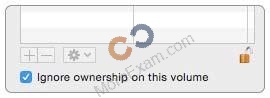
Question1: Review the screenshot, then answer the question below.

You connect a Mac OS Extended (Journaled)-formatted FireWire disk to a Mac configured as shown in the screenshot. What will happen the next time a standard user attempts to mount the hard disk?

Question2: Which folder contains instructions for the launchd process to start certain items when a user logs in to an OS X computer?

Question3: Which steps can you take to retrieve a file from a Time Machine backup on an external hard drive connected to your Mac?

Question4: Which statements are true about Guest accounts in Mac OS X? (Select TWO.)

Question5: Review the screenshot of a system configuration, then answer the question below.

Your Mac is configured as shown in the screenshot. Using Safari, you download an app from an unidentified developer and double-click the app icon. What happens?

Question6: You're logged in to a Mac as a standard user. How can you display the OS X Yosemite build number?

Question7: How do you start up a Mac in Safe Mode?

Question8: HOTSPOT
In the screenshot, click the icon of the OS X System Preferences pane where you can enable the feature that restores windows when apps are reopened.
Hot Area:

Question9: Which statement best describes the primary function of application sandboxing in OS X?

Question10: Which statement is true of ALL THREE buses: USB, FireWire, and Thunderbolt?

Question11: You downloaded an app using Safari. When you try to open the app, you see a message that says the application is damaged and cannot be opened, and that you should move it to the Trash. Which is a possible explanation?

Question12: On an OS X Mac, how can you display a list of installed software including software updates?

Question13: Which statement best describes how Time Machine stores files from an OS X computer when backing up to an external hard drive connected via FireWire?

Question14: Which of these are available from the Utilities menu when you start up from the OS X Recovery partition?
(Select TWO.)

Question15: Which is a valid reason to start up a Mac in verbose mode?

Question16: On a Mac with multiple user accounts, which default permission is assigned to a User's Documents folder?

Question17: How can you check the signal strength (RSSI) and transmit rate of a Wi-Fi network your computer is connected to?

Question18: You have configured several network locations on your OS X computer. How can you change from one location to another?

Question19: Review the screenshot from FileVault preferences, then answer the question below.

You click the Enable User button for the Bill Sykes account. What happens next?

Question20: When Marie logs in to her computer, she sees an error message that the system was unable to unlock her login keychain. What's a likely explanation for this?

Question21: In the Finder, how can you access the Library folder that's hidden inside the current user's home folder?

Question22: In OS X, you can use Disk Utility to create file archives in which format?

Question23: In a default OS X configuration, you want to configure OS X to delete ZIP files after they're expanded in the Finder. Where can you make that change?

Question24: How can you find out which application the Finder will use to open a specific document?

Question25: Which OS X tool can you use to create a strong password?

Question26: When you're starting up a Mac, which keyboard shortcut can you use to display detailed information about the startup process?

Question27: What should you be aware of when dragging apps to the Trash?

Question28: You started up your Mac from its OS X Recovery partition, and you need to repair the hard disk. Which procedure should you use?

Question29: On a Mac, where can user preferences for sandboxed apps be stored?

Question30: A computer running OS X Server 4 on your network is sharing files. On a Mac with OS X Yosemite, if you browse to the server from the sidebar in the Finder, which protocol will the Mac use by default to connect to the server?

Question31: Review the screenshot, then answer the question below.

While attempting to start up, an Intel-based Mac displays the icon shown above.
What does it indicate?

Question32: A user enables FileVault. Which methods for unlocking the disk does FileVault present to the user? (Select TWO.)

Question33: How do you start up an OS X computer in single-user mode?

Question34: HOTSPOT
In the screenshot below, click the icon of the preference pane where you configure OS X to access a Google mail account.
Hot Area:

Question35: Review the screenshot, then answer the question below.

If you change the folder privilege for "everyone" to Read & Write, the Finder changes item permissions inside the folder to match.

Question36: Migration Assistant is open on a Mac with OS X.
Which of these is NOT a source that user files can be migrated from?

Question37: How do you reset the printing system in OS X?

Question38: You're troubleshooting a Mac. Which is a valid reason for shutting down AND THEN starting up a Mac instead of selecting Restart from the Apple menu?

Question39: You're logged in on an OS X computer that has multiple user accounts. The Public folder for another user has default permissions. How can you access that folder?

Question40: HOTSPOT
You want to make documents available across your Mac and iOS devices. In the screenshot, click an icon of the preference pane where you can enable this feature.
Hot Area:

Question41: On your OS X computer, you want the Finder to display filename extensions by default. How can you configure this setting?

Question42: You backed up an OS X computer to a locally connected, unencrypted external hard drive via FireWire.
How did Time Machine store the data?

Question43: You're unable to connect to a web server from your OS X computer. How can Traceroute help you troubleshoot this issue?

Question44: Which folder contains items that tell launchd what to launch when OS X starts up?

Question45: In the Finder, which statement is true of file and folder permissions?

Question46: How can you display the serial number for a Mac you're logged in to?

Question47: Review the screenshot, then answer the question below.

If you click Delete User in the dialog shown above, what will happen to Erich's home folder?

Question48: You're configuring an OS X computer that will be in a public space. You want anyone to be able to log in and use Safari, but you do NOT want users' Safari browser history to remain on the computer after they log out. Which action should you take?

Question49: Which dynamic service discovery protocol does OS X use to discover devices on a network?
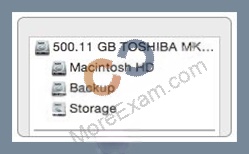
Question50: Which IP address could a Mac assign to its Ethernet interface if no DHCP services were available on the network?

Question51: Review the screenshot of a portion of the Disk Utility application window, then answer the question below.

Which statement best describes the item that's selected?

Question52: You can configure Time Machine to delete versions of files as soon as they reach a specified age.

Question53: When a user logs in, which task is NOT performed by loginwindow or launchd processes?

Question54: Which of these files will Time Machine, by default, NOT back up?

Question55: HOTSPOT
In the screenshot, click an icon of the preference pane where you enable spoken descriptions of items on the computer screen.
Hot Area:

Question56: Which describes the function of Safe Boot in OS X?

Question57: What is the result when you enable Stealth Mode in the OS X Firewall settings?

Question58: How can you exclude the /Users/anna/Downloads/ folder from Time Machine backups?

Question59: Which information do you need to know about a corporate VPN server before you can configure the built-in VPN capability on an OS X computer to access the corporate network?

Question60: Which tool can you use to search log files?

Question61: What's the role of the launchd process when an OS X computer starts up?

Question62: An OS X computer is connected to both an Ethernet and a Wi-Fi network. In Network System Preferences, how can you specify which interface the Mac will use to access the Internet?

Question63: You've started up a Mac from its Recovery partition. How do you open the Startup Disk utility?

Question64: You started up a Mac from its OS X Recovery partition. When you restarted, the Mac started up from the OS X Recovery partition again. How can you configure it to start up from a different volume?

Question65: When Time Machine backed up your file yesterday, the file was 5MB. Now that you've changed the file, it's
6MB. What does Time Machine do with the file at the next backup?

Question66: Along with IMAP, POP, and SMTP, which protocol does the Mail application in OS X support?

Question67: Which statement best describes the function of Gatekeeper?
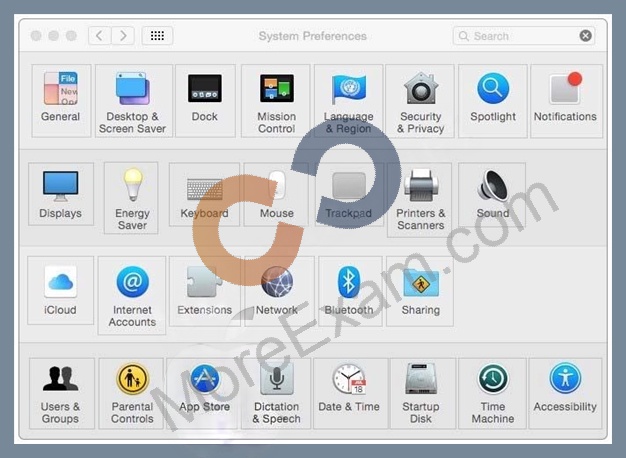
Question68: Which IP address could a Mac assign to its Ethernet interface if no DHCP services were available on the network?

Question69: HOTSPOT
In the screenshot, click the icon of the preference pane where you create a VPN configuration for your Mac.
Hot Area:

Question70: If you log in to OS X as a guest user, when you log out, OS X deletes any files you stored in /Users/ Shared/ during your session.

Question71: How can you display the contents of a hidden folder on a mounted volume in the Finder?

Question72: When a user creates archive files from the Finder, which archive format does OS X use by default?

Question73: Which will force a nonresponsive app to quit?

Question74: In what order do these three OS X components load when you start up a Mac?

Question75: Which restriction can you set in Parental Controls preferences?
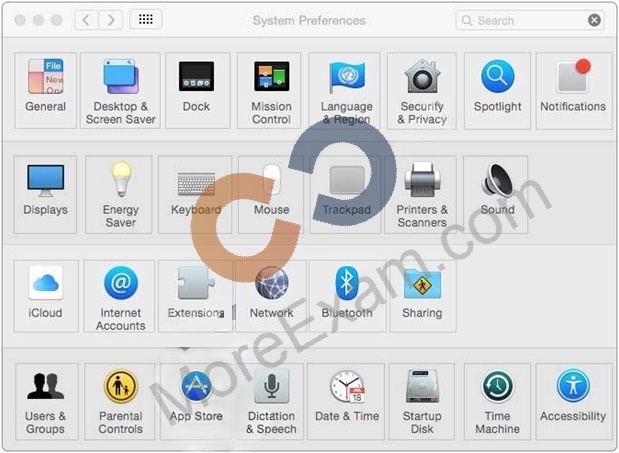
Question76: HOTSPOT
On a Mac, you connect to a server and then open System Preferences. In the screenshot, click the icon of the preference pane where you configure OS X to connect to the same server automatically each time you log in.
Hot Area:

Question77: Which utility is on the OS X Recovery partition?

Question78: In OS X, you must authenticate as an administrator before you can install apps from the Mac App Store.