EMT Practice Test

1. Question Content...


Question List

Question1: List all service account and create a service account called "admin"

Question2: Change the Image version back to 1.17.1 for the pod you just updated and observe the changes

Question3: Perform the following tasks:
* Add an init container tohungry-bear(which has beendefined in spec file
/opt/KUCC00108/pod-spec-KUCC00108.yaml)
* The init container should createan empty file named/workdir/calm.txt
* If/workdir/calm.txtis notdetected, the pod should exit
* Once the spec file has beenupdatedwith the init containerdefinition, the pod should becreated

Question4: Create a persistent volume with name app-data, of capacity 2Gi and access mode ReadWriteMany. The type of volume is hostPath and its location is /srv/app-data.

Question5: Set the node named ek8s-node-1 as unavailable and reschedule all the pods running on it.

Question6: Ensure a single instance of pod nginx is running on each node of the Kubernetes cluster where nginx also represents the Image name which has to be used. Do not override any taints currently in place.
Use DaemonSet to complete this task and use ds-kusc00201 as DaemonSet name.

Question7: Score: 13%

Task
A Kubernetes worker node, named wk8s-node-0 is in state NotReady. Investigate why this is the case, and perform any appropriate steps to bring the node to a Ready state, ensuring that any changes are made permanent.

Question8: Check to see how many worker nodes are ready (not including nodes tainted NoSchedule) and write the number to /opt/KUCC00104/kucc00104.txt.

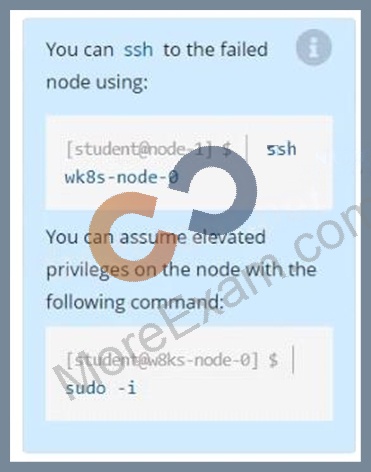
Question9: A Kubernetes worker node, named wk8s-node-0 is in state NotReady. Investigate why this is the case, and perform any appropriate steps to bring the node to a Ready state, ensuring that any changes are made permanent.
You can ssh to the failed node using:
[student@node-1] $ | ssh Wk8s-node-0
You can assume elevated privileges on the node with the following command:
[student@w8ks-node-0] $ | sudo -i

Question10: Task Weight: 4%

Task
Schedule a Pod as follows:
* Name: kucc1
* App Containers: 2
* Container Name/Images:
o nginx
o consul

Question11: List "nginx-dev" and "nginx-prod" pod and delete those pods
Question12: A Kubernetes worker node, named wk8s-node-0 is in state NotReady. Investigate why this is the case, and perform any appropriate steps to bring the node to a state, ensuring that any changes are made permanent.
You can ssh to the failed node using:
[student@node-1] $ | ssh Wk8s-node-0
You can assume elevated privileges on the node with the following command:
[student@w8ks-node-0] $ | sudo -i

Question13: Score: 4%

Task
Create a persistent volume with name app-data , of capacity 1Gi and access mode ReadOnlyMany. The type of volume is hostPath and its location is /srv/app-data .

Question14: Create the service as type NodePort with the port 32767 for the nginx pod with the pod selector app: my-nginx

Question15: Given a partially-functioningKubernetes cluster, identifysymptoms of failure on the cluster.
Determine the node, the failingservice, and take actions to bring upthe failed service and restore thehealth of the cluster. Ensure that anychanges are made permanently.
You cansshto the relevant Inodes (bk8s-master-0orbk8s-node-0) using:
[student@node-1] $ ssh<nodename>
You can assume elevatedprivileges on any node in thecluster with the followingcommand:
[student@nodename] $ | sudo -i

Question16: Deploy a pod with image=redis on a node with label disktype=ssd

Question17: Undo the deployment with the previous version and verify
everything is Ok
Question18: Monitor the logs of pod foo and:
Extract log lines corresponding
unable-to-access-website
Write them to/opt/KULM00201/foo

Question19: Delete the above pod and create again from the same yaml file
and verifies there is no "test-file.txt" in the path /data/redis
(Since non-persistent storage "emptyDir" is used).

Question20: From the pod label name=cpu-utilizer, find pods running high CPU workloads and write the name of the pod consuming most CPU to the file /opt/KUTR00102/KUTR00102.txt (which already exists).

Question21: Print pod name and start time to "/opt/pod-status" file

Question22: Pause the rollout of the deployment

Question23: Score: 7%

Task
Create a new NetworkPolicy named allow-port-from-namespace in the existing namespace echo. Ensure that the new NetworkPolicy allows Pods in namespace my-app to connect to port 9000 of Pods in namespace echo.
Further ensure that the new NetworkPolicy:
* does not allow access to Pods, which don't listen on port 9000
* does not allow access from Pods, which are not in namespace my-app

Question24: Create and configure the servicefront-end-serviceso it's accessiblethroughNodePortand routes to theexisting pod namedfront-end.

Question25: Get IP address of the pod - "nginx-dev"

Question26: Get list of all pods in all namespaces and write it to file "/opt/pods-list.yaml"

Question27: List all the pods sorted by created timestamp

Question28: Create a job named "hello-job" with the image busybox which echos "Hello I'm running job"

Question29: Ensure a single instance of pod nginx is running on each node of the Kubernetes cluster where nginx also represents the Image name which has to be used. Do not override any taints currently in place.
Use DaemonSet to complete this task and use ds-kusc00201 as DaemonSet name.

Question30: Schedule a pod as follows:
* Name: nginx-kusc00101
* Image: nginx
* Node selector: disk=ssd

Question31: Create an nginx pod and list the pod with different levels of verbosity

Question32: Get the deployment rollout status

Question33: Get list of all the pods showing name and namespace with a jsonpath expression.
Question34: Score: 7%

Task
First, create a snapshot of the existing etcd instance running at https://127.0.0.1:2379, saving the snapshot to /srv/data/etcd-snapshot.db.

Next, restore an existing, previous snapshot located at /var/lib/backup/etcd-snapshot-previo us.db

Question35: What are the differences between using a service versus using an application for Security Policy match?

Question36: What is the maximum number of samples that can be submitted to WildFire manually per day?

Question37: List all persistent volumes sorted by capacity, saving the full kubectl output to /opt/KUCC00102/volume_list. Use kubectl 's own functionality for sorting the output, and do not manipulate it any further.

Question38: Score: 5%

Task
Monitor the logs of pod bar and:
* Extract log lines corresponding to error
* Write them to /opt/KUTR00101/bar

Question39: Score: 5%

Task
From the pod label name=cpu-utilizer, find pods running high CPU workloads and write the name of the pod consuming most CPU to the file /opt/KUTR00401/KUTR00401.txt (which already exists).

Question40: Create a deployment as follows:
Name: nginx-app
Using container nginx with version 1.11.10-alpine
The deployment should contain 3 replicas
Next, deploy the application with new version 1.11.13-alpine, by performing a rolling update.
Finally, rollback that update to the previous version 1.11.10-alpine.

Question41: Get list of all the nodes with labels

Question42: Get IP address of the pod - "nginx-dev"

Question43: Create an nginx pod with containerPort 80 and it should check the pod running at endpoint / healthz on port 80 and verify and delete the pod.

Question44: Create a nginx pod with label env=test in engineering namespace
Question45: Score: 4%

Context
You have been asked to create a new ClusterRole for a deployment pipeline and bind it to a specific ServiceAccount scoped to a specific namespace.
Task
Create a new ClusterRole named deployment-clusterrole, which only allows to create the following resource types:
* Deployment
* StatefulSet
* DaemonSet
Create a new ServiceAccount named cicd-token in the existing namespace app-team1.
Bind the new ClusterRole deployment-clusterrole lo the new ServiceAccount cicd-token , limited to the namespace app-team1.

Question46: Create a pod as follows:
Name: non-persistent-redis
container Image: redis
Volume with name: cache-control
Mount path: /data/redis
The pod should launch in the staging be persistent.

Question47: Create 2 nginx image pods in which one of them is labelled with env=prod and another one labelled with env=dev and verify the same.

Question48: Set the node namedek8s-node-1asunavailable and reschedule all thepods running on it.

Question49: Check the Image version of nginx-dev pod using jsonpath

Question50: Score: 7%

Task
Create a new nginx Ingress resource as follows:
* Name: ping
* Namespace: ing-internal
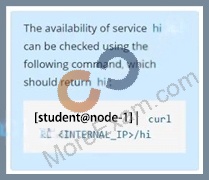
* Exposing service hi on path /hi using service port 5678

Question51: Check to see how many worker nodes are ready (not including nodes tainted NoSchedule) and write the number to /opt/KUCC00104/kucc00104.txt.

Question52: Task Weight: 4%

Task
Scale the deployment webserver to 3 pods.

Question53: Create a pod that echo "hello world" and then exists. Have the pod deleted automatically when it's completed

Question54: Get the number of schedulable nodes and write to a file
/opt/schedulable-nodes.txt

Question55: Perform the following tasks:
Add an init container to hungry-bear defined in spec file
/opt/KUCC00108/pod-spec-KUC
The init container should create /workdir/calm.txt
If /workdir/calm.txt is not
Once the spec file has been definition, the pod should be created

Question56: Delete the pod without any delay (force delete)

Question57: Create a file:
/opt/KUCC00302/kucc00302.txt that lists all pods that implement service baz in namespace development.
The format of the file should be one pod name per line.

Question58: Create a pod as follows:
Name: mongo
Using Image: mongo
In a new Kubernetes namespace named: my-website

Question59: List all the pods showing name and namespace with a json path expression

Question60: Create a deployment as follows:
* Name:nginx-random
* Exposed via a servicenginx-random
* Ensure that the service & podare accessible via theirrespective DNS records
* The container(s) within anypod(s) running as a part of thisdeployment should use thenginxImage Next, use the utilitynslookupto lookup the DNS records of the service &pod and write the output to
/opt/KUNW00601/service.dnsand/opt/KUNW00601/pod.dnsrespectively.

Question61: Create a daemonset named "Prometheus-monitoring" using image=prom/Prometheus which runs in all the nodes in the cluster. Verify the pod running in all the nodes

Question62: Score: 4%

Task
Schedule a pod as follows:
* Name: nginx-kusc00401
* Image: nginx
* Node selector: disk=ssd

Question63: Score: 7%

Task
Create a new nginx Ingress resource as follows:
* Name: ping
* Namespace: ing-internal
* Exposing service hi on path /hi using service port 5678

Question64: A bootstrap USB flash drive has been prepared using a Linux workstation to load the initial configuration of a Palo Alto Networks firewall. The USB flash drive was formatted using file system ntfs and the initial configuration is stored in a file named init-cfg.txt.
The contents of Init-cfg.txt in the USB flash drive are as follows:
type=static
ip-address=10.5.107.19
default-gateway=10.5.107.1
netmask=255.255.255.0
Ipv6-address=2001:400:100::1/64
ipv6-default-gateway=2001:400:100::2
hostname=Ca-FW-DC1
panorama-server=10.5.107.20
panorama-server-2=10.5.107.21
tplname=FINANCE TG4
dgname=finance_dg
dns-primary=10.5.6.6
op-command-modes multi-vsys.jumbo-frame
dhcp-send-hostname=no
dhcp-send-client-id=no
dhcp-accept-server-hostname=no
dhcp-accept-server-domain=no
The USB flash drive has been inserted in the firewalls' USB port, and the firewall has been powered on.Upon boot, the firewall fails to begin the bootstrapping process. The failure is caused because:

Question65: Create a file:
/opt/KUCC00302/kucc00302.txt that lists all pods that implement service in namespace development.
The format of the file should be one pod name per line.

Question66: List all the pods sorted by created timestamp

Question67: Ensure a single instance of pod nginx is running on each node of the Kubernetes cluster where nginx also represents the Image name which has to be used. Do not override any taints currently in place.
Use DaemonSet to complete this task and use ds-kusc00201 as DaemonSet name.

Question68: Check the history of deployment
Question69: List all configmap and secrets in the cluster in all namespace and write it to a file /opt/configmap-secret

Question70: Monitor the logs of pod foo and:
Extract log lines corresponding to error
unable-to-access-website
Write them to /opt/KULM00201/foo

Question71: Create a Kubernetes secret as follows:
* Name: super-secret
* password: bob
Create a pod named pod-secrets-via-file, using the redis Image, which mounts a secret named super-secret at
/secrets.

Question72: Create a pod that having 3 containers in it? (Multi-Container)

Question73: On the NGFW, how can you generate and block a private key from export and thus harden your security posture and prevent rogue administrators or other bad actors from misusing keys?