MoreExam
1. Question Content...
EXPLANATION
Answer: X - EXPLANATION Content.
Question1: Modify file content.------------------------Create a playbook called /home/admin/ansible/modify.yml as follows:* The playbook runs on all inventory hosts* The playbook replaces the contents of /etc/issue with a single line of text asfollows:--> On hosts in the dev host group, the line reads: "Development"--> On hosts in the test host group, the line reads: "Test"--> On hosts in the prod host group, the line reads: "Production"
Question2: Install the RHEL system roles package and create a playbook called timesync.yml that:--> Runs over all managed hosts.--> Uses the timesync role.--> Configures the role to use the time server 192.168.10.254 ( Hear in redhat labuse "classroom.example.com" )--> Configures the role to set the iburst parameter as enabled.
Question3: Create user accounts--------------------------> A list of users to be created can be found in the file called user_list.ymlwhich you should download from http://classroom.example.com/user_list.yml andsave to /home/admin/ansible/--> Using the password vault created elsewhere in this exam, create a playbook calledcreate_user.ymlthat creates user accounts as follows:--> Users with a job description of developer should be:--> created on managed nodes in the "dev" and "test" host groups assigned thepassword from the "dev_pass"variable and these user should be member of supplementary group "devops".--> Users with a job description of manager should be:--> created on managed nodes in the "prod" host group assigned the password fromthe "mgr_pass" variableand these user should be member of supplementary group "opsmgr"--> Passwords should use the "SHA512" hash format. Your playbook should work usingthe vault password filecreated elsewhere in this exam.while practising you to create these file hear. But in exam have to download as perquestation.user_list.yml file consist:---user:- name: user1job: developer- name: user2job: manager
Question4: Create the users in the file usersjist.yml file provided. Do this in a playbook called users.yml located at /home/sandy/ansible. The passwords for these users should be set using the lock.yml file from TASK7. When running the playbook, the lock.yml file should be unlocked with secret.txt file from TASK 7.All users with the job of 'developer' should be created on the dev hosts, add them to the group devops, their password should be set using the pw_dev variable. Likewise create users with the job of 'manager' on the proxy host and add the users to the group 'managers', their password should be set using the pw_mgr variable.
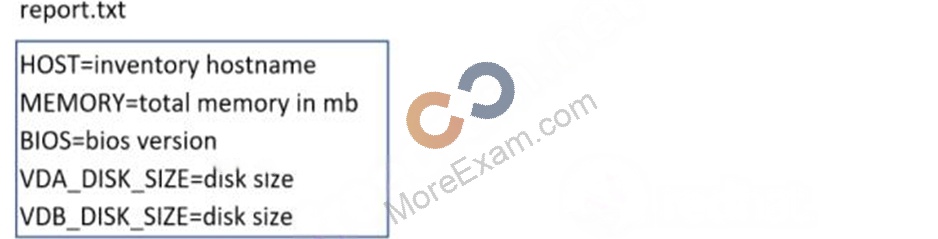
Question5: Create a file in /home/sandy/ansible/ called report.yml. Using this playbook, get a file called report.txt (make it look exactly as below). Copy this file over to all remote hosts at /root/report.txt. Then edit the lines in the file to provide the real information of the hosts. If a disk does not exist then write NONE.
Question6: Create a file called requirements.yml in /home/sandy/ansible/roles a file called role.yml in /home/sandy/ansible/. The haproxy-role should be used on the proxy host. And when you curl http://node3.example.com it should display "Welcome to node4.example.com" and when you curl again "Welcome to node5.example.com" The php-role should be used on the prod host.
Question7: Generate a hosts file:* Download an initial template file hosts.j2 from http://classroom.example.com/hosts.j2 to/home/admin/ansible/ Complete the template so that it can be used to generate a file with a line for each inventory host in the same format as /etc/hosts:172.25.250.9 workstation.lab.example.com workstation* Create a playbook called gen_hosts.yml that uses this template to generate the file /etc/myhosts on hosts in the dev host group.* When completed, the file /etc/myhosts on hosts in the dev host group should have a line for each managed host:127.0.0.1 localhost localhost.localdomain localhost4 localhost4.localdomain4::1 localhost localhost.localdomain localhost6 localhost6.localdomain6172.25.250.10 serevra.lab.example.com servera172.25.250.11 serevrb.lab.example.com serverb172.25.250.12 serevrc.lab.example.com serverc172.25.250.13 serevrd.lab.example.com serverd-----------------------------------------------------------------while practising you to create these file hear. But in exam have to download as per questation.hosts.j2 file consists.localhost localhost.localdomain localhost4 localhost4.localdomain4::1localhost localhost.localdomain localhost6 localhost6.localdomain6-------------------------------------------------------------------
Question8: Create an ansible vault password file called lock.yml with the password reallysafepw in the /home/sandy/ansible directory. In the lock.yml file define two variables. One is pw_dev and the password is 'dev' and the other is pw_mgr and the password is 'mgr' Create a regular file called secret.txt which contains the password for lock.yml.
Question9: Create a playbook /home/bob /ansible/motd.yml that runs on all inventory hosts and docs the following: The playbook should replaee any existing content of/etc/motd in the following text. Use ansible facts to display the FQDN of each hostOn hosts in the dev host group the line should be "Welcome to Dev Server FQDN".On hosts in the webserver host group the line should be "Welcome to Apache Server FQDN".On hosts in the database host group the line should be "Welcome to MySQL Server FQDN".
Question10: Create a role called sample-apache in /home/sandy/ansible/roles that enables and starts httpd, enables and starts the firewall and allows the webserver service. Create a template called index.html.j2 which creates and serves a message from /var/www/html/index.html Whenever the content of the file changes, restart the webserver service.Welcome to [FQDN] on [IP]Replace the FQDN with the fully qualified domain name and IP with the ip address of the node using ansible facts. Lastly, create a playbook in /home/sandy/ansible/ called apache.yml and use the role to serve the index file on webserver hosts.
Question11: Install and configure ansibleUser sandy has been created on your control node with the appropriate permissions already, do not change or modify ssh keys. Install the necessary packages to run ansible on the control node. Configure ansible.cfg to be in folder /home/sandy/ansible/ansible.cfg and configure to access remote machines via the sandy user. All roles should be in the path /home/sandy/ansible/roles. The inventory path should be in /home/sandy/ansible/invenlory.You will have access to 5 nodes.node1.example.comnode2.example.comnode3.example.comnode4.example.comnode5.example.comConfigure these nodes to be in an inventory file where node I is a member of group dev. nodc2 is a member of group test, node3 is a member of group proxy, nodc4 and node 5 are members of group prod. Also, prod is a member of group webservers.
Question12: Create a playbook called timesvnc.yml in /home/sandy/ansible using rhel system role timesync. Set the time to use currently configured nip with the server 0.uk.pool.ntp.org. Enable burst. Do this on all hosts.
Question13: Install and configure ansibleUser bob has been created on your control node. Give him the appropriate permissions on the control node. Install the necessary packages to run ansible on the control node.Create a configuration file /home/bob/ansible/ansible.cfg to meet the following requirements:* The roles path should include /home/bob/ansible/roles, as well as any other path that may be required for the course of the sample exam.* The inventory file path is /home/bob/ansible/inventory.* Ansible should be able to manage 10 hosts at a single time.* Ansible should connect to all managed nodes using the bob user.Create an inventory file for the following five nodes:nodel.example.comnode2.example.comnode3.example.comnode4.example.comnode5.example.comConfigure these nodes to be in an inventory file where node1 is a member of group dev. nodc2 is a member of group test, nodc3 is a member of group proxy, nodc4 and node 5 are members of group prod. Also, prod is a member of group webservers.